



The Companion Method: Learning Side-by-Side, at Your Pace
When people think about computer lessons, it can be easy to picture one person explaining while the other person listens and tries to keep up.
That is not how I like to teach.
At Cairns Friendly Computer Lessons, I use what I call the Companion Method. It is built around the idea that learning works best when teacher and student are working alongside each other rather than one person simply delivering instructions to the other. Welcome pack
The Companion Method has six parts: I do, we do, you do; Guided Self Practice; mistake-positive learning; active questioning; friendly conversation; and clearing confusion.
Together, they create a learning environment where students can build skills gradually, ask questions freely and become more confident doing things for themselves.
I Do, We Do, You Do
I first learned to use the I do, we do, you do approach while working as a teacher aide with Prep students. It turns out that the same basic idea works very well with adults.
When we learn a new computer skill, I begin by slowly demonstrating the task while the student watches. I explain what I am doing as I go, including the larger steps and the smaller actions that make those steps possible.
Then we complete the task together.
Finally, the student has a go independently, with me there if support is needed. Welcome pack
The important thing is that this is not a rigid sequence.
Sometimes we reach the “you do” stage and discover that one part still feels uncertain. That simply tells us to go back to “we do” for a while. If we need to return all the way to “I do” and watch the task again, that is completely fine.
Learning is allowed to move backwards and forwards until the skill feels steady.
As I demonstrate, I also explain the macro-steps and micro-steps involved in the task. If you would like to know more about that part of my teaching approach, I explain it in The Stepping-Stone Pathway: Why the Smallest Steps Matter. The Stepping-Stone Pathway looks at how the large steps of a computer task can be broken down into the small physical actions that beginners are often expected to somehow already know. The Stepping-Stone Pathway Arti…
Guided Self Practice
Learning does not stop when the lesson ends.
Between lessons, I encourage students to practice the skills we have worked on. The difference is that I do not expect them to go home and simply remember everything on their own.
After each lesson, I send a personalised guide covering what we worked through together. It includes the steps needed to complete the task, including the macro-steps and micro-steps, and may also include screenshots where they are useful. Welcome pack
That is why I call it Guided Self Practice.
The student is practising independently, but the support has not disappeared.
They have something familiar to follow, and if they become stuck or something in the guide does not make sense, they can contact me for clarification.
The aim is to gradually build the ability to complete the task without me sitting beside them, while still having support available during that transition.
Mistake-Positive Learning
Mistakes are not something I try to remove from learning.
They are part of learning.
Some of the strongest skills we possess are the ones we learned by trying something, not getting it quite right, working out what happened and trying again.
A mistake gives us information.
It might show us that one step is still unclear. It might reveal that two buttons look similar. It might show that the student understands what needs to happen but their hands have not yet become familiar with the movement.
That is useful.
At Cairns Friendly Computer Lessons, mistakes are treated as opportunities to strengthen a skill rather than evidence that somebody is “bad with computers.” Welcome pack
I sometimes think of mistakes as the gold inside the stone. They may not look valuable at first, but when we stop, examine them and work through them, they often become some of the most useful parts of the learning process.
Active Questioning
Questions are an important part of the Companion Method.
I do not encourage questions simply because it sounds welcoming. I encourage them because curiosity builds knowledge.
Students are welcome to ask questions during lessons, and the questions do not have to relate directly to the particular task we are working on. A seemingly unrelated question about something they noticed on the screen, a word they heard somewhere or something their computer did during the week can still add another piece to their overall understanding. Welcome pack
I encourage students to write questions in their learning notebook between lessons so they do not have to rely on remembering them later. Each lesson includes dedicated time where we can go through those questions together. Welcome pack
Every answered question adds something to the student’s knowledge bank.
Over time, those small pieces of understanding begin connecting with each other.
Friendly Conversation
Friendly conversation might sound like the least technical part of a computer lesson, but I think it is one of the most important.
A relaxed conversation helps create a calm atmosphere where learning can happen naturally. It also gives computer language somewhere to live.
Instead of learning technical terms as isolated vocabulary, students hear them used during ordinary conversation while we work. I can introduce the correct computer terminology alongside a plain-language explanation and gradually use those terms more as they become familiar. Welcome pack
But conversation is about more than vocabulary or rapport.
I do not see myself as being above the student because I happen to know more about computers.
We are two people sitting on the same side of the problem.
I bring computer knowledge and teaching experience. The student brings their own goals, experiences, questions and knowledge of what works for them.
We work together to grow their digital independence.
Clearing Confusion
Confusion is something I want students to tell me about.
Sitting quietly with something that does not make sense does not help learning move forward.
If a student tells me they are confused, that gives me useful information. I can explain the idea differently, demonstrate the task again, break it into smaller steps or sometimes find a different way of completing the task that feels more natural to them. Welcome pack
There is rarely only one way to explain something.
One explanation might make perfect sense to one person and mean absolutely nothing to someone else.
Clearing confusion means we deal with that uncertainty while it is happening instead of building more learning on top of something that was never properly understood.
Learning Together
The six parts of the Companion Method work together.
I do, we do, you do provides a flexible way to move from demonstration toward independence.
Guided Self Practice lets that learning continue between lessons without removing support.
Mistake-positive learning turns errors into useful information.
Active questioning gives curiosity room to grow.
Friendly conversation creates a calm, equal learning environment.
And clearing confusion makes sure uncertainty is addressed rather than ignored.
At Cairns Friendly Computer Lessons, the goal is not simply to help somebody complete a computer task while I am sitting beside them.
It is to work alongside them while the knowledge, skills and confidence gradually become their own.
That is why I call it the Companion Method.
The Companion Method: Learning Side-by-Side, at Your Pace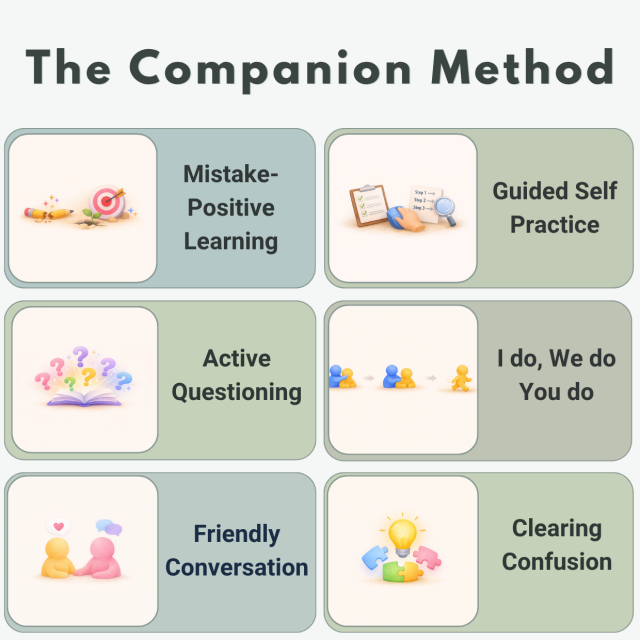
Visit my Business Website
Welcome Visitor 5
To distribute this article more widely To manage this article or write your own article simply LOGIN
| ||||||
