



The Stepping-Stone Pathway: Why the Smallest Steps Matter
When someone has been using a computer for years, many of the small actions involved in a task become automatic.
If I want to open my email, I do not consciously think about looking at the taskbar, finding the email icon, moving the cursor over it and clicking the left mouse button. I simply think, open my email.
For a beginner, though, those small actions are not automatic yet.
That is where computer teaching can sometimes become frustrating. A person may be given perfectly correct instructions and still feel lost because several smaller steps have been skipped along the way.
At Cairns Friendly Computer Lessons, I use what I call the Stepping-Stone Pathway to help prevent that.
The idea is simple: every computer task can be broken down into more than just the obvious steps. There are the larger steps of the task, and underneath those are the smaller physical actions that make each step possible.
The Steps We Often Forget to Explain
Imagine I am teaching someone how to send an email.
At a broad level, the steps might sound simple: open the email program, start a new message, enter the recipient, write the message and send it.
Those are what I think of as the macro-steps.
But even the instruction open your email program assumes quite a lot.
A beginner may also need to know:
where on the screen to look
what the email icon looks like
how to move the cursor to it
which mouse button to press
whether to single-click or double-click
what should happen after clicking
how to recognise when the program has opened
where to look next once the screen changes
Those are the micro-steps.
To an experienced computer user, they barely register. To someone who is still learning, they can be the difference between understanding a task and feeling completely lost.
Goal, Skill, Macro-Step, Micro-Step
The Stepping-Stone Pathway starts with the bigger picture.
First, we identify the goal. This is the reason the person wants to learn in the first place. It might be keeping in touch with family, managing everyday tasks online or becoming more independent with their computer.
From there, we identify the skills that will help them move toward that goal.
One of those skills might be sending an email to a friend.
That skill is then broken into macro-steps, such as opening the email program, creating a blank message and addressing the email.
Then we look underneath those steps and identify the micro-steps that are needed to actually carry them out.
This means I am not simply telling someone what to do. I am helping them understand how to do it.
Nothing Is Too Small to Explain
One of the most important things I learned while teaching computer users is that a step is only “obvious” once you already know it.
That is why I try not to assume that someone knows where to look, what something is called or what their hands are supposed to do next.
If we need to slow down and talk about how to position the cursor, we do that.
If we need to practice clicking once without accidentally double-clicking, we do that.
If a student is unsure which part of the screen I am referring to, we stop and make that clear before moving forward.
There is no prize for rushing through a task if the person is still unsure how they got there.
Building Independence One Step at a Time
The purpose of breaking tasks into micro-steps is not to make computer learning more complicated. It is to make it clearer.
Once the small actions become familiar, they gradually require less conscious thought. Over time, yesterday’s micro-step becomes today’s automatic action.
That is how confidence grows.
At Cairns Friendly Computer Lessons, my goal is not simply to help someone complete a task while I am sitting beside them. I want them to understand the pathway well enough that, eventually, they can follow it on their own.
Each small step becomes a stepping stone. One stone leads to the next, and over time those individual actions form a clear path toward greater confidence and digital independence.
The Stepping-Stone Pathway: Why the Smallest Steps Matter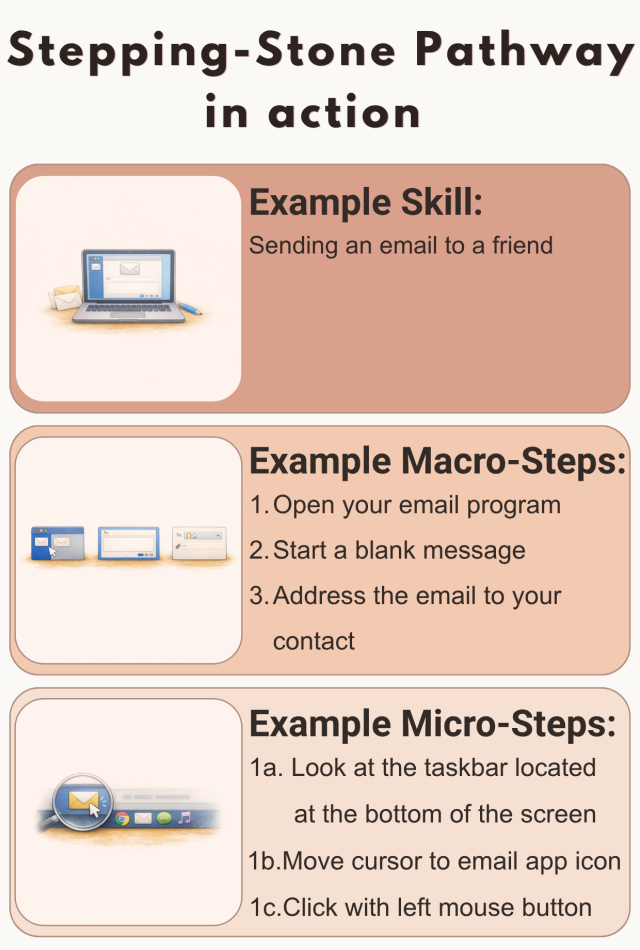 
Visit my Business Website
Welcome Visitor 4
To distribute this article more widely To manage this article or write your own article simply LOGIN
| ||||||
